 NorahPacker
The boring half of Intune publishing, done for you.
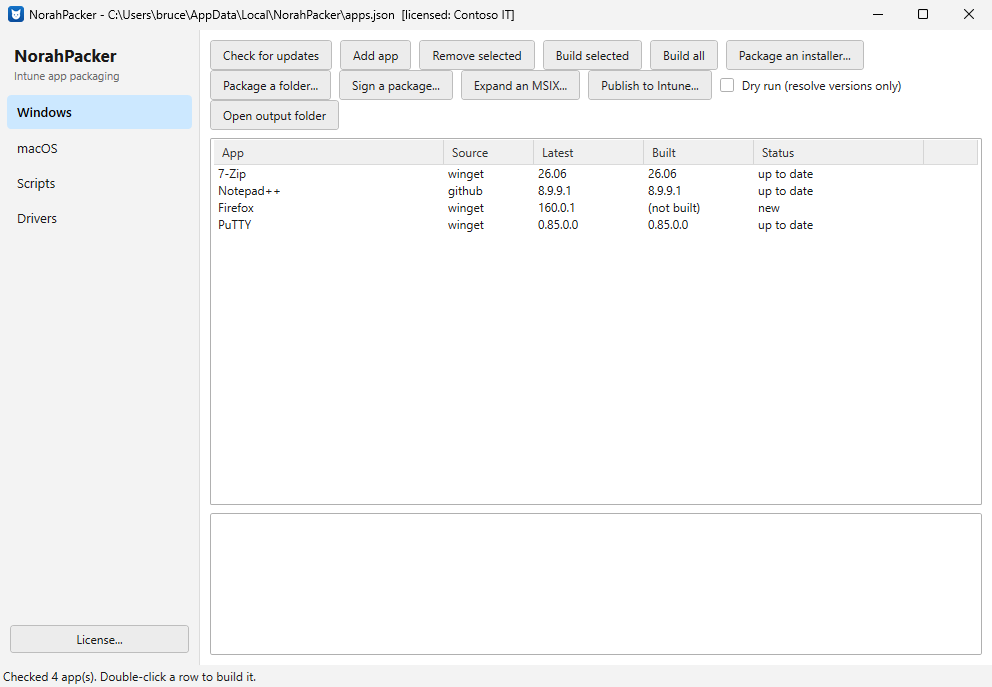
Keep a list of the apps your organization deploys. NorahPacker finds each one’s newest official installer, builds the .intunewin file, and writes out every value the Intune admin center asks for — install command, uninstall command, detection rules. You review and upload; it handles everything before that.
FREE VERSION: 30-day evaluation key · Windows 10/11 and Server · no account, no telemetry — licensing is a signed file verified completely offline
If you publish Win32 apps, you know every one of these.
One list. One window. Five steps.
Add your apps
winget id, a search word, a GitHub repo, a vendor URL, or an installer you already have.
Check for updates
Resolves the current version of everything and tells you what moved. Downloads nothing.
Build
Downloads, verifies, wraps, packages. Only the apps that are stale rebuild.
Upload
A fresh .intunewin plus intune-app.json with every wizard value, copy-paste ready.
Retire the old one
Old versions stay on disk forever, so a rollback is one upload away.
It stops at a ready-to-upload package by default — publishing to your tenant is an optional, explicit step. The same engine drives a GUI window, an interactive CLI menu, and a headless scheduled mode for servers, so the output is identical whichever you use.
Wherever your apps live, it can fetch them.
| Source | What it covers |
|---|---|
| winget | Microsoft’s own package catalog — thousands of apps, added by id or by search. Silent-install switches come from the catalog where published. |
| GitHub releases | Any project that ships release assets. Give it owner/repo; it picks the newest release for your architecture (x64 / arm64 / x86). |
| Vendor URLs | Installers hosted on a vendor’s own site: paste the download URL and where the version number appears; the tool substitutes the version each run. |
| Your own files | Point it at any .exe or .msi (even drag & drop) and get the identical package. Swap the file later and it rebuilds — it notices by content hash. |
One license. Every feature.
No add-ons and no tiers with holes — free and paid licenses both include everything below, and it all ships in one self-contained program.
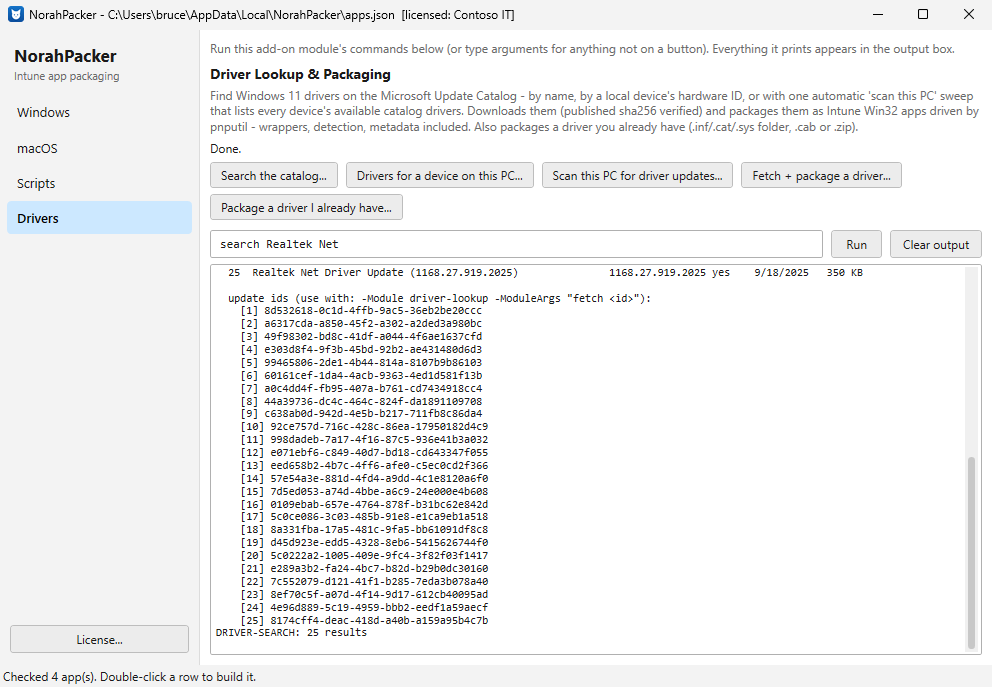
Driver Lookup & Packaging
Find Windows 11 drivers on the Microsoft Update Catalog — by name, by a hardware ID, or with one automatic scan of the PC you are on.
- Downloads verified against Microsoft’s published SHA-256
- Packages via pnputil with detection and install/uninstall wrappers
- Or package a driver folder / .cab / .zip you already have
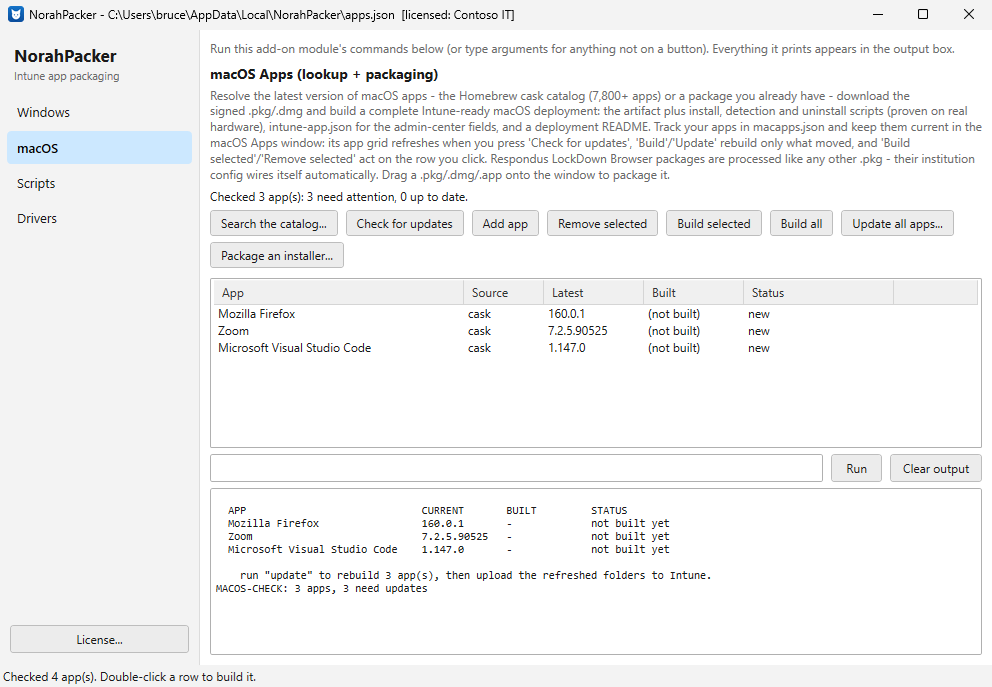
macOS app packaging
Package macOS deployments for Intune from your Windows machine — no Mac required.
- Resolves latest versions from the Homebrew cask catalog (7,800+ apps) or takes a .pkg / .dmg you already have
- LockDown Browser is a first-class scenario, including the fix for the classic renamed-package install failure
- Produces a self-contained deployment folder: install / detect / uninstall / repair scripts plus every Intune value
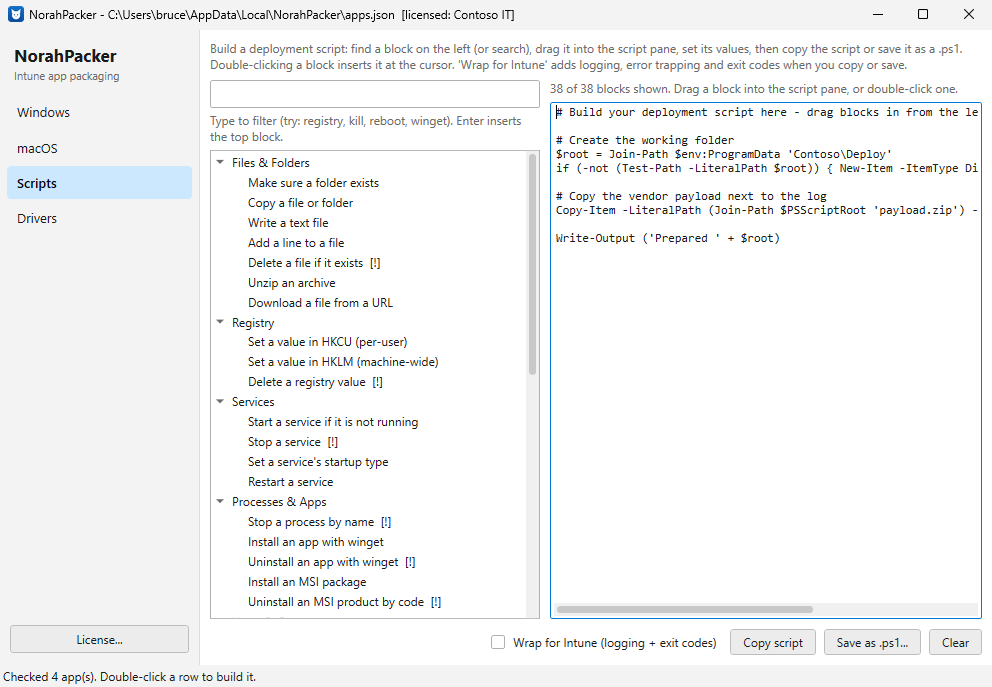
Script Builder
Compose deployment scripts without writing PowerShell: search or browse 65 grouped command blocks, drop them into the pane, fill in the values.
- Every block is verified to produce code that actually runs
- Copy or save the finished script — optionally wrapped for Intune with logging and exit codes
MSIX signing & app attach
Code-sign an .msix / .appx / .msi / .exe in place, or build app-attach images for AVD and pooled hosts.
- Publisher-vs-certificate mismatches explained up front; timestamped by default
- VHDX / VHD / CIM images via Microsoft’s msixmgr, with a ready-to-run attach note
Publish to Intune
Optional: push a finished package straight into your own tenant — opt-in, device-code sign-in, create-or-update.
- Nothing is ever published unless you press the button
- Detection rules and install/uninstall commands carry across automatically; tokens never touch disk
PSADT packages & folder content
Wrap installs in a real PSAppDeployToolkit deployment, or package a whole folder of installer content as one Win32 app.
- Official PSADT template, pinned and hash-checked at build time
- Desktop-shortcut cleanup and wrapper-based detection built in
One window, either theme
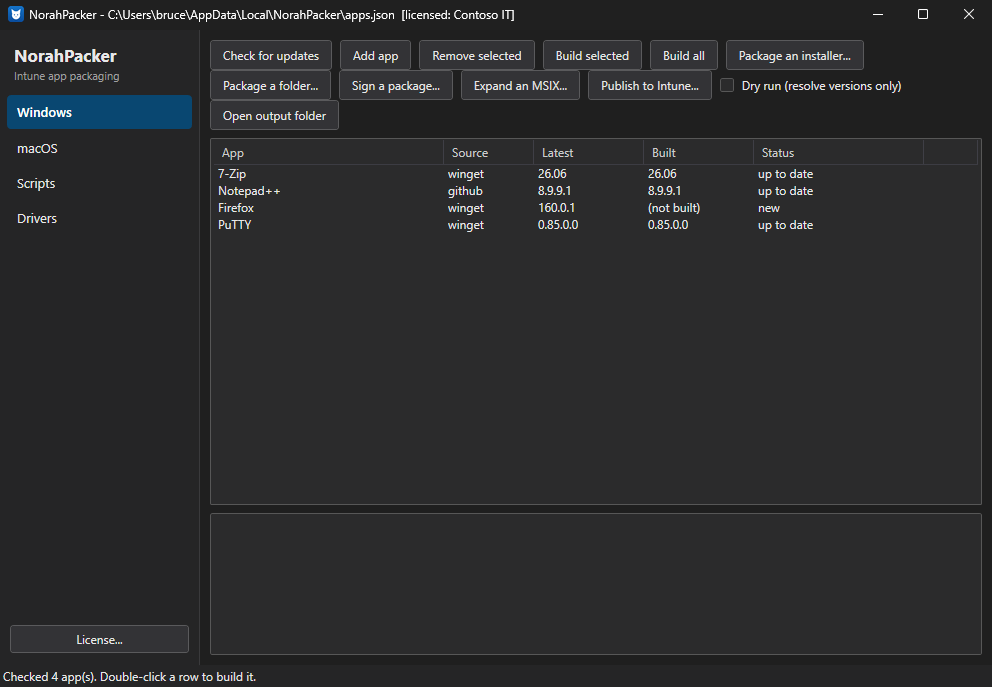
A single window with a section rail — Windows, macOS, Scripts, Drivers — that follows your Windows light/dark theme.
- Sections switch in place; nothing spawns extra windows
- Same engine behind the GUI, the interactive CLI, and scheduled runs
One window, every job — in light or dark.
Screenshots from the real build — no mockups.
Simple, and priced by size.
One license covers your whole organization — every technician, every computer. Try everything with the FREE VERSION for 30 days; a flat $800 covers the first 250 computers, and every computer beyond that adds $2.00 per year. Published prices, no quotes, no per-seat math.
FREE VERSION
A full-featured evaluation key for any organization. Renew it from this page every 30 days.
- Full packaging pipeline
- All sources: winget, GitHub, vendor URLs, local installers
- Every feature included — drivers, macOS packaging, script builder, MSIX tools, Intune publishing
- Scheduled / headless mode included
- Signed key, verified completely offline
One key per email every 30 days. The key is signed and works offline — no account needed.
Complete
includes your first 250 computers — then $2.00/year for each additional computer
or $2,160 for three years save $240
For organizations of any size. Everything included.
- Unlimited technicians — no per-seat math
- The first 250 computers included; $2.00/year for each computer after that
- Every feature included — drivers, macOS packaging, script builder, MSIX tools, Intune publishing
- 1-year or 3-year terms; 3-year plans save 10% and lock your price for the full term
- Renews with the same company name - nothing to reinstall
Early adopter special: $800/year at any organization size — every computer you manage — for orders placed in the first six months. Early-adopter licenses renew at the standard rate for your size.
How keys work: your license is a small signed file (license.key) that verifies completely offline — no activation step, nothing phones home, no data collected. Evaluation needs no key at all; building packages needs one, and the FREE VERSION is a 30-day key you can request from this page. The app ships compiled and sealed — there is no readable script to copy or tamper with.
By purchasing, you agree to the Terms of Service; how information is handled is spelled out in the Privacy Policy.
A note on trust. This product lives on trust: the FREE VERSION is for evaluation, and production use needs a paid license. I have no way of checking what you actually manage — please just be honest. Thank you for trying this out. And if you are going to pirate it, just reach out: I would rather work something out than have you get a virus on all your computers.
Questions admins actually ask.
Does it upload to Intune for me?
Only if you ask it to. By default it stops at a ready-to-upload .intunewin and gives you every value the admin center asks for. The optional Publish to Intune… step pushes a finished package into your own tenant with a device-code sign-in (after a one-time Entra app registration) — nothing is published unless you press it, and the sign-in token is held in memory only, never written to disk.
What about apps that are not in winget?
GitHub releases, vendor download pages, and any installer — or folder of installer content — you already have are all first-class sources. Drivers come from the Microsoft Update Catalog, macOS packaging uses the Homebrew cask catalog (or a .pkg / .dmg you supply), and Script Builder covers deployment scripts that are not an installer at all.
Why do some apps install but never report “Installed”?
That is a detection-rule problem, and it is the single most common way an Intune Win32 app silently fails. NorahPacker writes the detection rule with the package: MSI installers get the product code read straight from the file, and wrapped EXE installs get a registry marker the wrapper writes on success. Nobody has to hand-write a path rule or guess a version check.
Can it run unattended?
Yes. NorahPacker.exe -Scheduled is a headless mode built for Task Scheduler or a small server: it checks what moved and rebuilds only that, writes a report, and returns exit codes you can alert on. Add -DryRun for a report-only pass; -Force, -ConfigPath and -OutputRoot work exactly as they do on the CLI. Scheduled runs also sweep the macOS list when one is configured.
What are the requirements?
Windows 10/11 or Windows Server with .NET Framework 4.8 (built into current Windows). The app is a single compiled program — no PowerShell runtime required; Windows PowerShell is used only by the deployment scripts it writes for Intune. winget is needed only for winget-based apps. It installs from the included MSI; administrator rights are needed for the install only. Driver packaging and MSIX app-attach images ask for an administrator shell, and signing uses your own .pfx certificate.
Will it keep working without paying?
The FREE VERSION key runs for 30 days and unlocks everything. When it expires, request a new one from this page (one per email every 30 days); it is the same drop-in key file, nothing to reinstall. If a key lapses, the app still checks versions and runs dry builds, but packaging pauses until the renewal is in. Production use needs a Complete license.
How does the price scale as we grow?
Every license includes the first 250 computers in the flat $800/year. Beyond that, it is $2.00 per year for each additional computer. There is no metering and nothing phones home — you simply tell us your size when you order and at each renewal. A 3-year term takes 10% off and locks the price for the whole term.
How do we get a FREE VERSION key?
Use the form in the FREE VERSION card above: enter your work email and organization, and the key appears on the page (usually in under a minute). One key per email every 30 days; keys are signed and work completely offline. No account, no email confirmation.
Can it sign a package and build app-attach images?
Yes — both are part of the build. Sign a package… signs an .msix, .appx, .msi or .exe in place with your own .pfx certificate, timestamped by default. MSIX needs a signature to install, and the tool checks the file’s Publisher against the certificate up front — the classic reason MSIX signing fails. Expand an MSIX… builds a VHDX, VHD or CIM app-attach image via Microsoft’s msixmgr (fetched and SHA-256 verified on first use, or point it at your own copy) and writes a notes file with the exact attach command beside the image.
Do I need a Mac to package macOS apps?
No. Search the Homebrew cask catalog (7,800+ apps) from the Windows app, fetch the installer with SHA-256 verification, and the tool builds the full Intune deployment folder: install, detect, uninstall and repair scripts plus every value the admin center asks for. Respondus LockDown Browser is a first-class flow, including the fix for the renamed-package install failure. Already have a .pkg or .dmg? Point it at that instead.
Where do driver packages come from?
The Microsoft Update Catalog — search by name or hardware ID, or scan this PC for available driver updates. Downloads are verified against Microsoft’s published SHA-256 before anything is packaged, and the package is built around pnputil with detection and install/uninstall wrappers. Already have a driver folder, .cab or .zip? Point the tool at it.